 Cajista
A SmartAlbums alternative
Cajista is album layout software for wedding and portrait photographers. It does what you're looking for when you look up SmartAlbums — build the spreads and get the file the lab needs — with three differences you notice on day one. And with gaps that are worth reading before you switch tools mid-season.
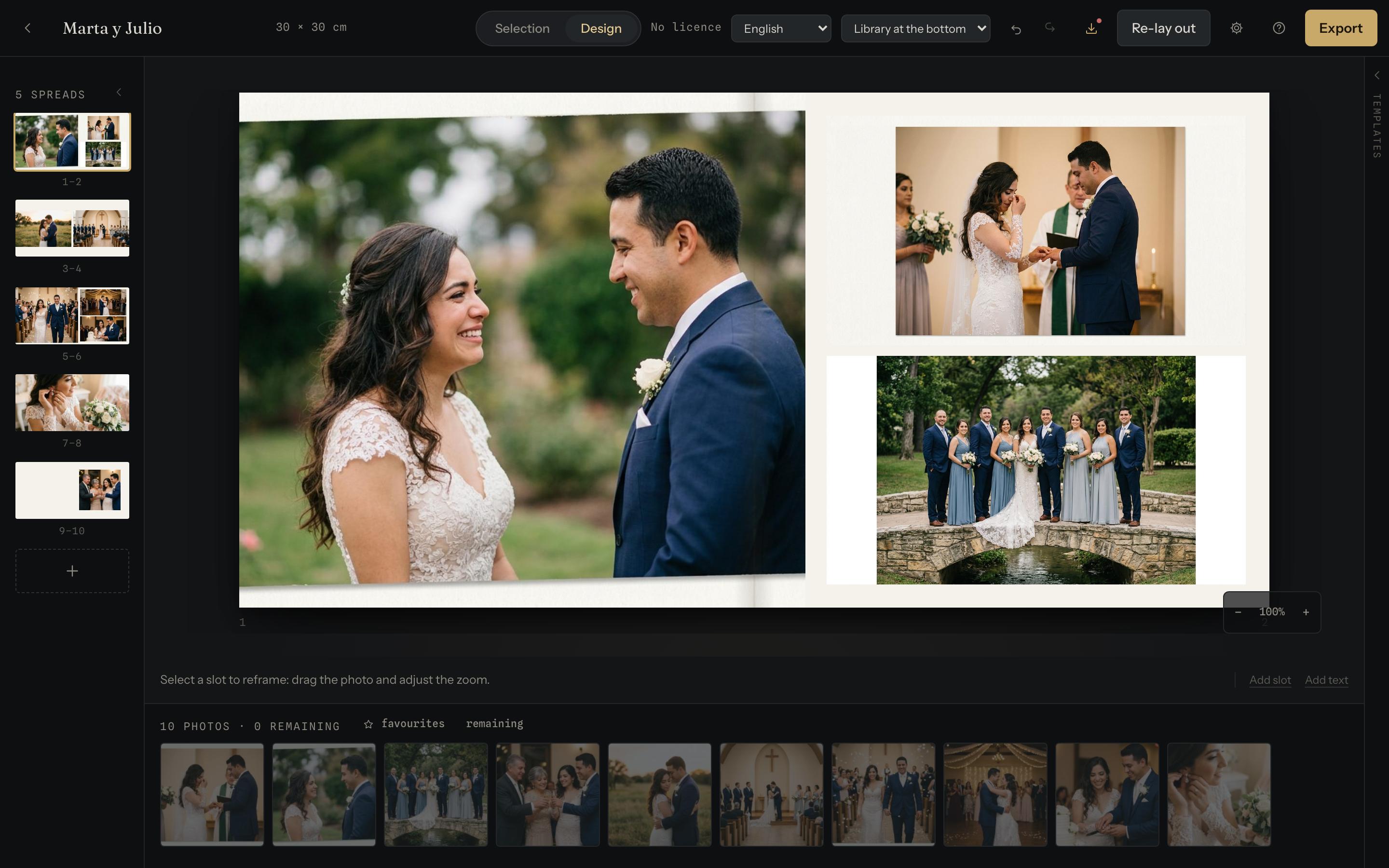
The three differences that matter
Your photos never leave your machine
Not one. No upload, no account, no server holding your clients' weddings. It isn't a promise in a privacy policy: it's how the thing is built, and you can check it by watching your browser's network traffic while you work.
There is nothing to install
Cajista opens in your browser and behaves the same on Mac and on Windows. No versions, no updates to download, no licence tied to one particular computer: the same key works on up to three.
Laying out is free; delivering is what you pay for
Importing, grouping, laying out and adjusting cost nothing, with no album limit and no expiry. You only pay for the full-size file for the lab. You can build an entire wedding before deciding whether it's worth it.
Where SmartAlbums will look more mature
Better said here than discovered in your first hour. Pixellu has been at this for years and has a company behind it; Cajista is young and smaller. Specifically:
- The template catalogue is shorter. Cajista ships 28 layouts, picked so they don't repeat within one album, and lets you save your own. A catalogue with years of accumulation has more.
- There is no lab integration. You export the file and upload it wherever you work. Orders don't go out from inside the program.
- There is no client review inside the program. What there is, is an export for review — a light PDF, no watermark — that you send however you already talk to your clients.
- It doesn't import projects from other programs. Albums you have half-finished get finished where they are.
If any of those four is central to how you work, this page just saved you an afternoon.
When you shouldn't switch
- If you depend on your lab's own templates and their exact sizes.
- If you send print orders from inside the program and don't want to stop.
- If several people in the studio share projects: here the album lives on one machine.
- If you're in the middle of a delivery. Changing tools with a wedding half-done never goes well — not with this program, not with any.
What you can do at no risk is build the next album in parallel, without paying anything, and compare it with the work you've already done.
How to try it on a real wedding
-
Open Cajista and import the shoot It reads capture times and groups the day on its own: getting ready, ceremony, reception.
-
Star your favourites and lay it out The engine builds the spreads; you move whatever doesn't convince you, dragging from one slot to another.
-
Export for review No licence and no watermark. It's the file you show the couple.
-
Decide then If the result works for you, the print file — full size, with bleed and profile — is the only thing you pay for.
Questions
Can Cajista open albums I made in SmartAlbums?
No. Cajista doesn't import projects from other programs: albums already under way are finished where they are, and new ones start in Cajista. That is exactly why it's worth trying it on a whole wedding first — which is free.
Is there anything to install?
No. Cajista runs inside your browser, the same on Mac and on Windows, and there is no account to create. We test it thoroughly in Chrome; current desktop browsers work.
Are photos uploaded to a server?
No. There is no such feature in the program. Photos stay in your computer's storage, and you can check it by watching your browser's network traffic while you use it. The privacy policy spells it all out.
Do I need an internet connection to lay out an album?
To open Cajista, yes, like any website. Once it's open, importing, adjusting spreads and exporting for review don't use the network: if the connection drops mid-work, you keep working and nothing is lost. Automatic layout, changing template and authorising a print export do need it, a few seconds each time. Your photos don't travel in any of those requests.
What if I stop paying one day?
Your albums stay yours and keep opening, editing and exporting for review. The only thing that stops is the print file. Nobody holds your work hostage: it's on your computer.
How does the price compare to SmartAlbums?
Our prices are on Pricing, tax included and with no tiers. Theirs are on their site: we don't reproduce them here because a copied figure ages badly, and comparing against a stale price isn't comparing. What is genuinely different is what you pay for: here, laying out costs nothing and only the file that goes to the lab is paid.
Want to talk it through?
Write to hola@cajista.com and tell us how you work — album size, lab, how many weddings a year — and a person will answer. If the honest answer is that switching isn't worth it for you, you'll get that too.
SmartAlbums and Pixellu are trademarks of their respective owners. Cajista is not associated with or endorsed by them. The differences described here refer to Cajista and to what their product publicly does; if something has changed or you think something isn't accurate, write to us and we'll correct it. Reviewed on 20 August 2026.